Added the ability for Users to adjust their Email Notifications through /settings/notifications.
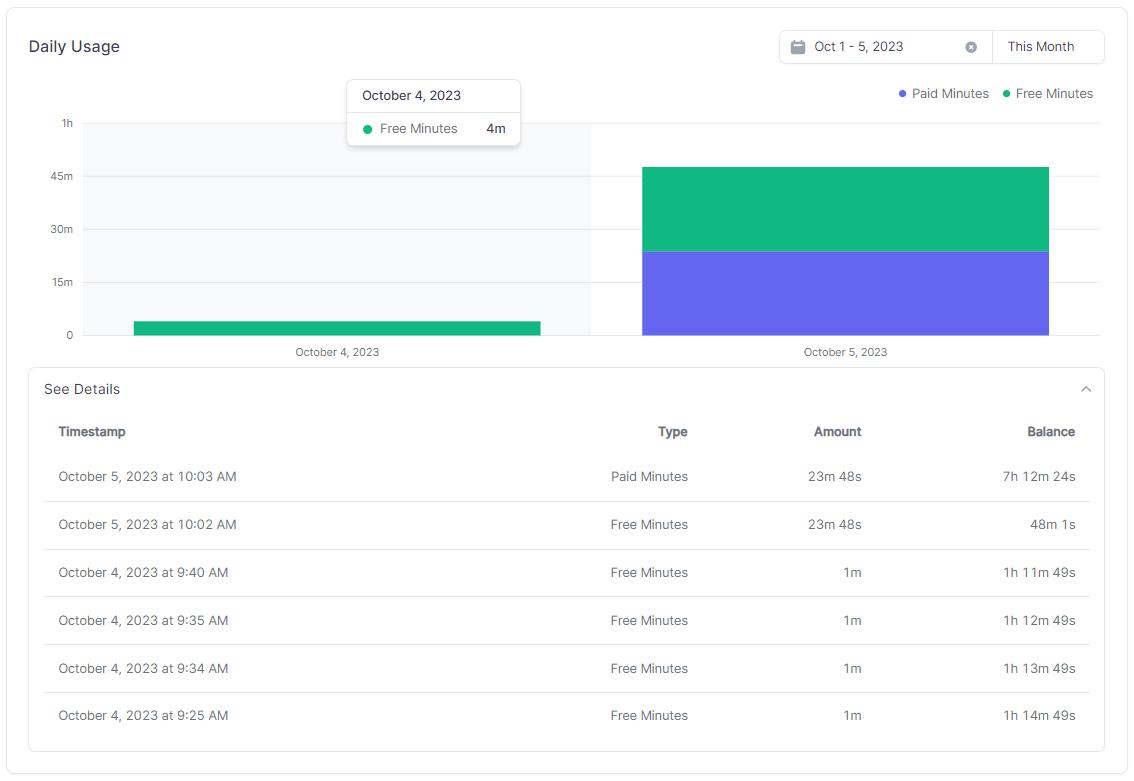
Added a new Usage Chart & Table to granularly explore your Usage of the platform. This can be found at /settings/usage.
🎨UI/UX Updates🎨
Revamped the Layout of the Changelog Articles to have a sticky Table of Contents on the left side of the page for medium sized devices and up, and a Table of Contents at the top of the page for mobile devices. This allows you to easily navigate the Changelog Article without having to scroll all the way back to the top of the page.
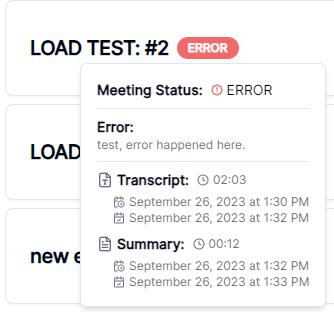
Updated the Meeting Status Badge to correctly show the current status of a Meeting that has an ERROR status. Previously, it would show UNKNOWN for all Meetings that had an error occur. Additionally, the Status Badge will additionally display the Error Message when hovering over it.
🚀Performance Improvements🚀
🐞Bug Fixes🐞
Fixed an issue with Sharing Meetings, where you would select either Viewer or Editor, but would only be Editor when the meeting was shared.
Fixed an issue with Sharing Meetings, where the owner was able to share the meeting with themselves.
Fixed an issue where a non-owner (Viewer or Editor) was able to Delete the Meeting or Meeting Chat.
Fixed an issue where a non-owner (Viewer or Editor) was able to Like the Meeting.
Fixed an issue with the Speaker Cards possibly having duplicate Keys when using the Speaker Name as the key. Switched to using the Speaker ID and Math.random() as a backup.
Fixed an issue where a User was always redirect to /dashboard/meetings after Uploading a Meeting. Now, they are only redirected if they are not already on a /dashboard/meetings path, which prevents any Query String Parameters from being lost.
Fixed an issue where a User was always redirect to /dashboard/meetings after Deleting a Meeting. Now, they are only redirected if they are not already on a /dashboard/meetings path, which prevents any Query String Parameters from being lost.
Fixed an issue where a User who created a Meeting or Chat through the use of the Navbar + New Button would not have the Popup Modals close after the Meeting or Chat was created.
✨Improvements✨
Added the new Query String Parameter of time to the Meeting Page. This allows you to specify a time in the meeting to start at, and will automatically scroll to that time when the page loads. This is useful for sharing a specific time in the meeting with someone else.
Reconfigured the Meeting Chat QnA to be only display the Meeting Chat messages of the Current User, irregardless of it they are the Owner or a Viewer/Editor. This allows both the Owner and Viewer/Editor to have their own isolated Meeting Chat QnA.
📧Email Updates📧
📈Analytics📈
Implemented a delete_meeting Custom Event to track when a user deletes a meeting, with the following Event Parameters:
email: The email address of the user who liked/unliked the meeting.
id: The ID of the meeting.
name: The name of the meeting.
owner: The email address of the meeting owner.
Implemented a create_meeting_chat Custom Event to track when a user creates a new meeting chat message, with the following Event Parameters:
email: The email address of the user who liked/unliked the meeting.
id: The ID of the meeting.
name: The name of the meeting.
owner: The email address of the meeting owner.
message: The message that was sent.
Implemented a search_transcript Custom Event to track when a user searches a Meeting Transcript, with the following Event Parameters:
email: The email address of the user who liked/unliked the meeting.
id: The ID of the meeting.
name: The name of the meeting.
owner: The email address of the meeting owner.
query: The search query.
text: The transcript segment text that was selected.
💡Core Functionality Quality Control💡
🔄In Progress🔄
Rework the entire Auth middleware setup, considering utilizing Iron Session.
Look into adopting something like reactour to create a User Onboarding experience for new users.
✅Completed✅
Upgrade the Transcription & Diarization backend to use the newly released pyannote.audio 3.0.0 library, and make sure the WhisperX implementation is up to date with the latest changes.

![Weekly Release Notes [2023-10-06]](/_next/image?url=%2Fimages%2Fweekly_release_notes.webp&w=3840&q=75)